Designing cross-device payments for PlayStation
Payments could begin on PS5, continue on a phone or payment app, and finish after the original screen stopped receiving updates. I designed the handoffs and recovery states that kept the player informed across those systems.
- Role
- Lead product designer
- Scope
- PS5, mobile web, Tandem Commerce, and PlayStation Direct
- Team
- Product, engineering, UX research, and UX writing
- Outcome
- 65% faster card setup and 22% lower cart abandonment on PlayStation Direct
One purchase crossed several systems, so no screen had the full story
Typing payment details with a controller was slow. Moving the task to mobile made input easier, but divided the experience across PS5, mobile web, and external payment providers.
Players still experienced it as one purchase. They needed to know where to continue, whether they could leave the console, and whether the payment had completed.
Mobile card entry was faster, but the console lost visibility after handoff
Tandem Commerce let players scan a QR code on PS5 and enter their card details on their phone.
Once mobile took over, the console stopped receiving transaction updates. Leaving the QR code on screen created two problems:
- Players could not tell whether the scan worked
- They could start another payment while the mobile session was still active
The easiest implementation would have left the console unchanged. That pushed the system limitation onto the player.
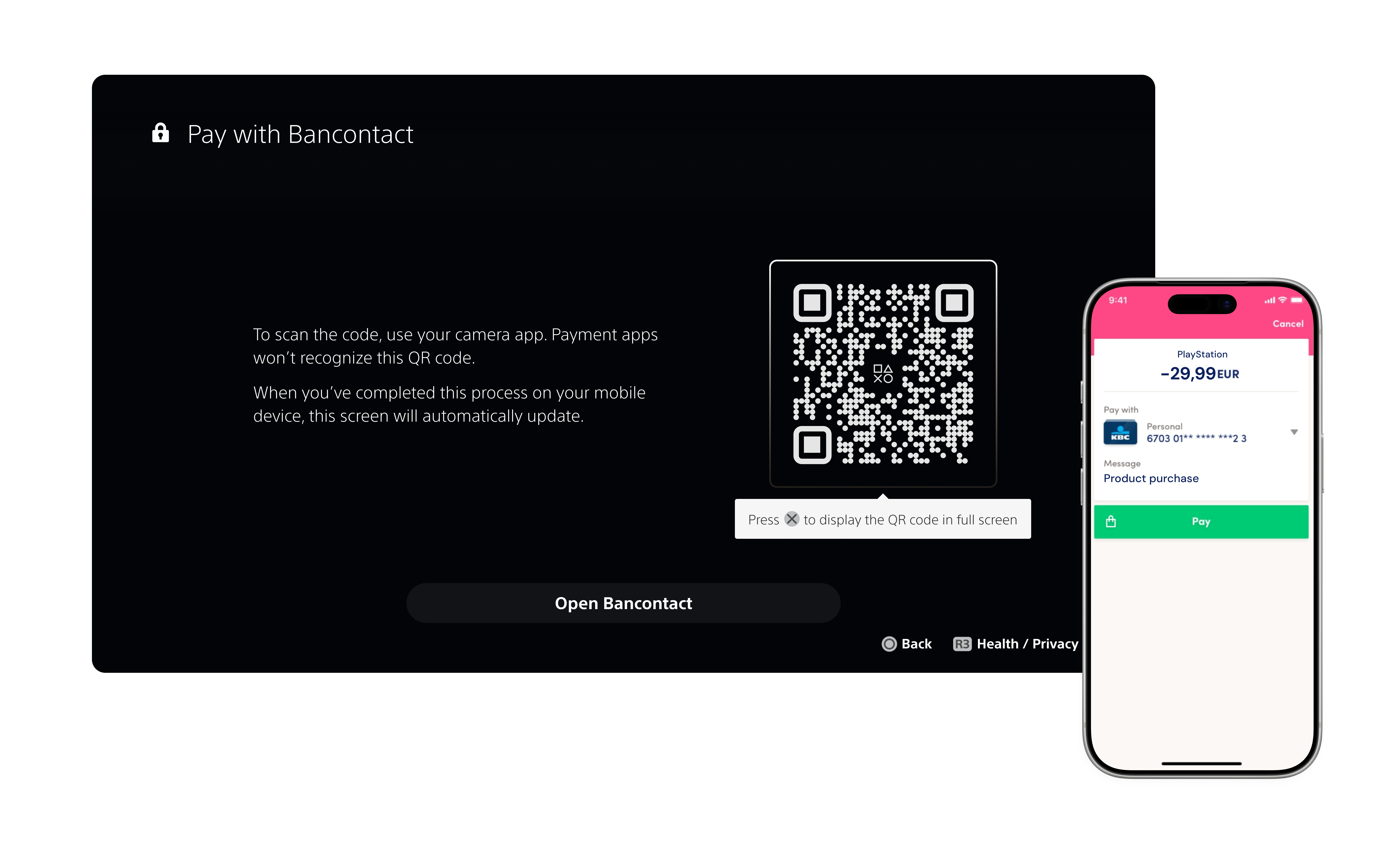
An intermediary state confirmed the handoff and blocked duplicate attempts
I introduced a console state that appeared as soon as the QR code was scanned. It confirmed that the payment had moved to the phone and prevented another attempt from starting on PS5.
I also defined what happened when players pressed Back. Leaving the console did not cancel the mobile session, so the message explained that the payment would continue. Returning to the QR screen let players restart without navigating back through the entire purchase flow.
Research showed players needed clearer expectations before leaving PS5
Participants preferred entering payment information on their phones and described it as faster and more secure. The uncertainty was around the handoff:
- Some thought Confirm purchase would charge them immediately
- Two participants questioned where the QR code would take them
- Players were unsure whether leaving PS5 would interrupt the payment
Participant feedback
I prefer using the phone. All of my information is there, and I feel it’s more secure.— P1
The option to scan is nice. It should all be automatic (picking up all of the credit card information to avoid as much typing as possible).— P4
I want it to be as frictionless as possible. There are no speed bumps here. It’s pretty smooth — the QR code helped make it faster. It would be even faster on my own phone.— P5
Does this support Apple Pay or Android Pay? That would be great.— P6
I clarified when the charge would happen, described the QR destination before scanning, and told players when it was safe to leave the console.
A timeout could appear after the player had already paid
PlayStation Direct introduced Bancontact and iDEAL through external payment providers.
A player could complete payment with the provider before PlayStation received confirmation. If the provider or PlayStation timed out during that gap, the existing design showed a generic error.
Reusing that error screen would have been faster, but it could tell a paying customer that the transaction had failed when its status was still pending.
Illustrative — the gap between the timeout and the confirmation is the problem, not a specific duration.
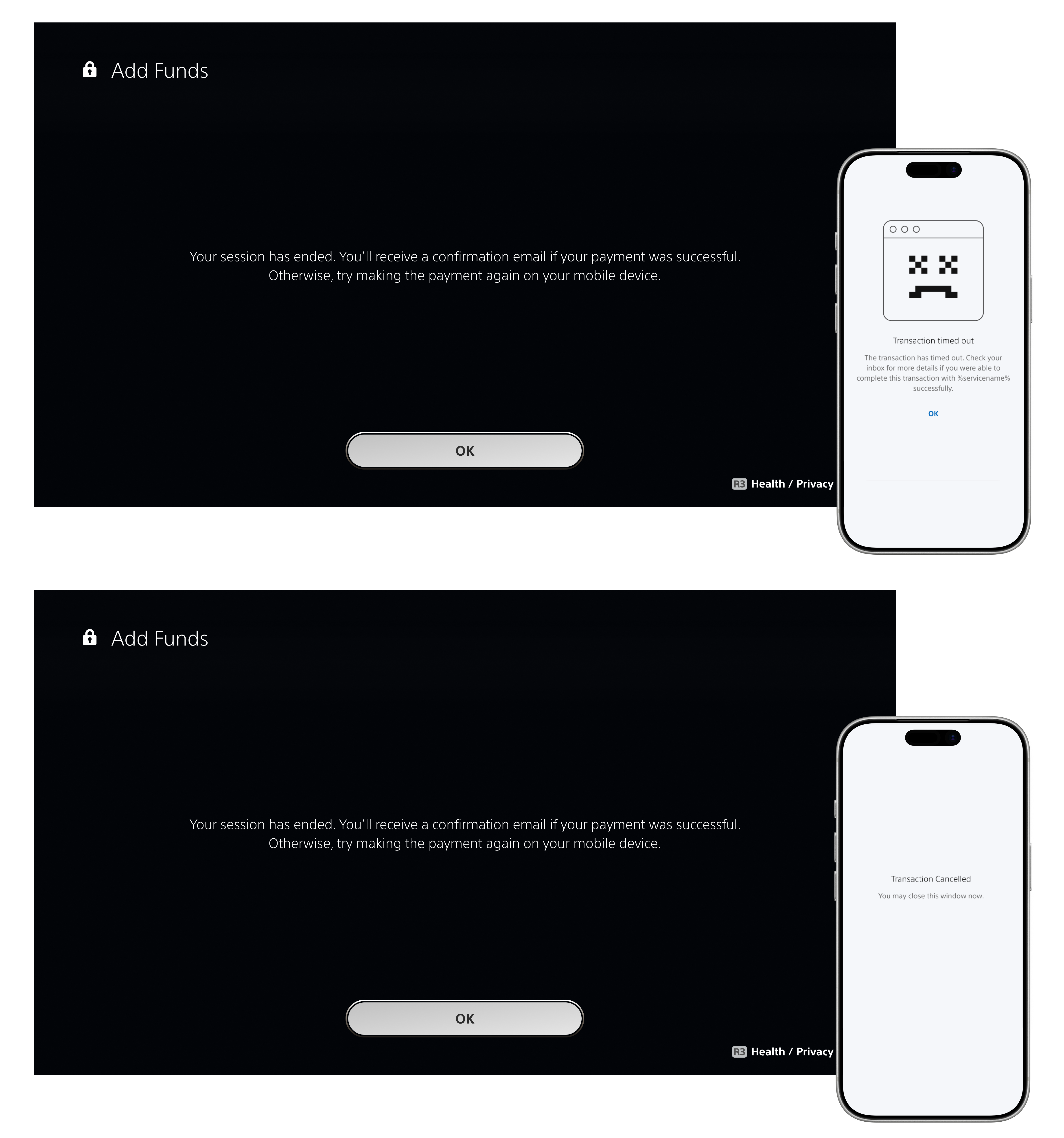
A customer could pay before PlayStation received confirmation
PlayStation Direct added Bancontact for Belgium and iDEAL for the Netherlands. Both methods sent customers to an external payment provider.
A customer could complete payment with the provider before PlayStation received confirmation. Provider behavior and return paths also differed across regular purchases, pre-orders, and payment changes.
The generic timeout left customers without a clear next step
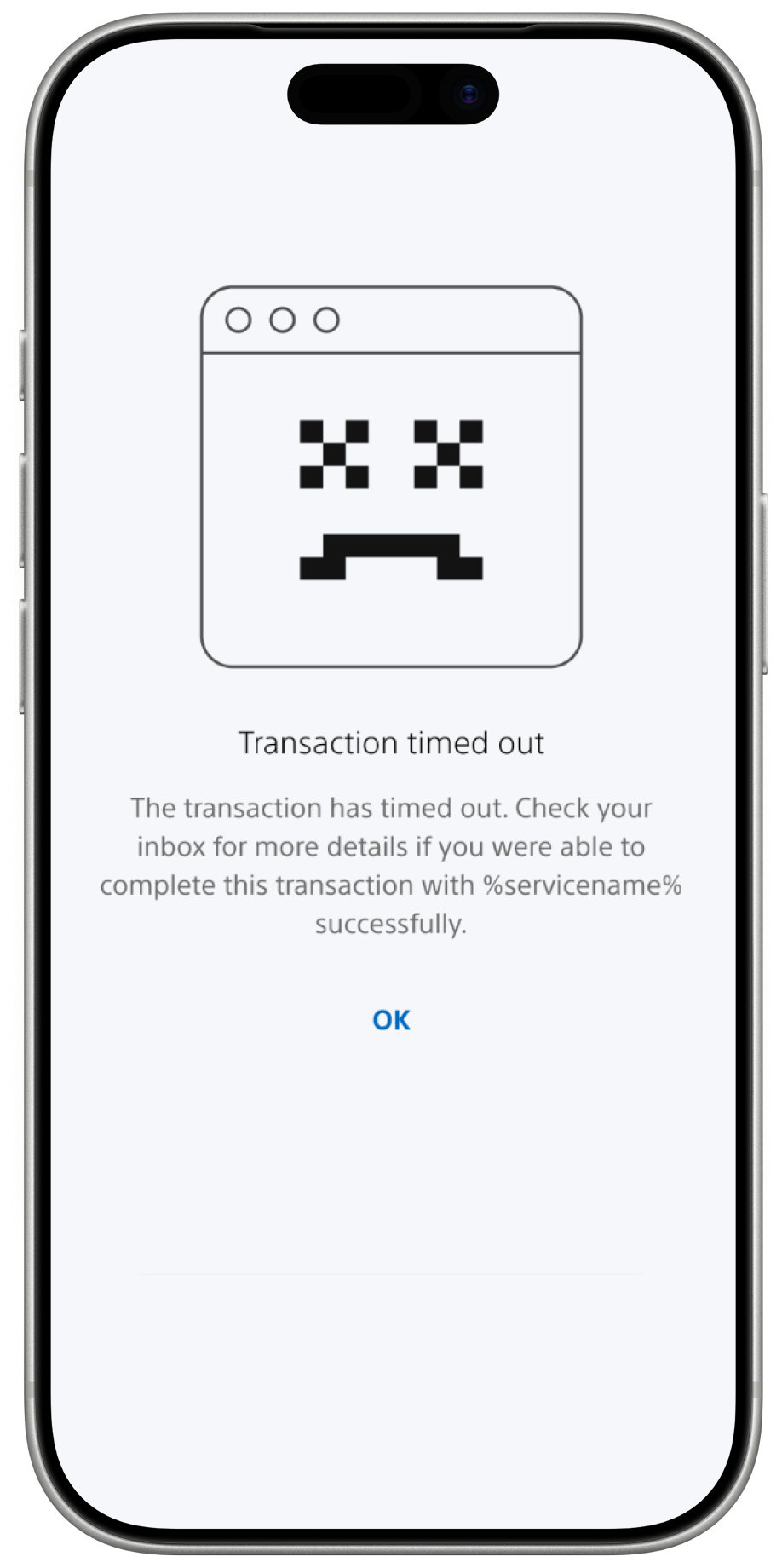
The existing screen showed a generic timeout message and an OK button. It did not explain what had happened, what status to expect, or how to continue.
Customers had to work out whether to wait, try again, or start over. The flow needed clearer information about the payment state and a recovery path that matched what they had already done.
I mapped the full payment flow before designing recovery
Before designing the recovery flow, I worked with engineering to map the cart, order, QR session, Bancontact app, and PlayStation backend across the full payment timeline.
The QR code expired after 15 minutes. PlayStation could then keep the order pending for up to 24 hours while waiting for confirmation from the provider. A customer could complete the provider step even though PlayStation did not yet have a final status.
The recovery page therefore needed to:
- Explain why confirmation could take longer
- Avoid prompting an unnecessary second payment
- Guide customers based on what they had already done
Customers could see what happened and choose the right recovery path
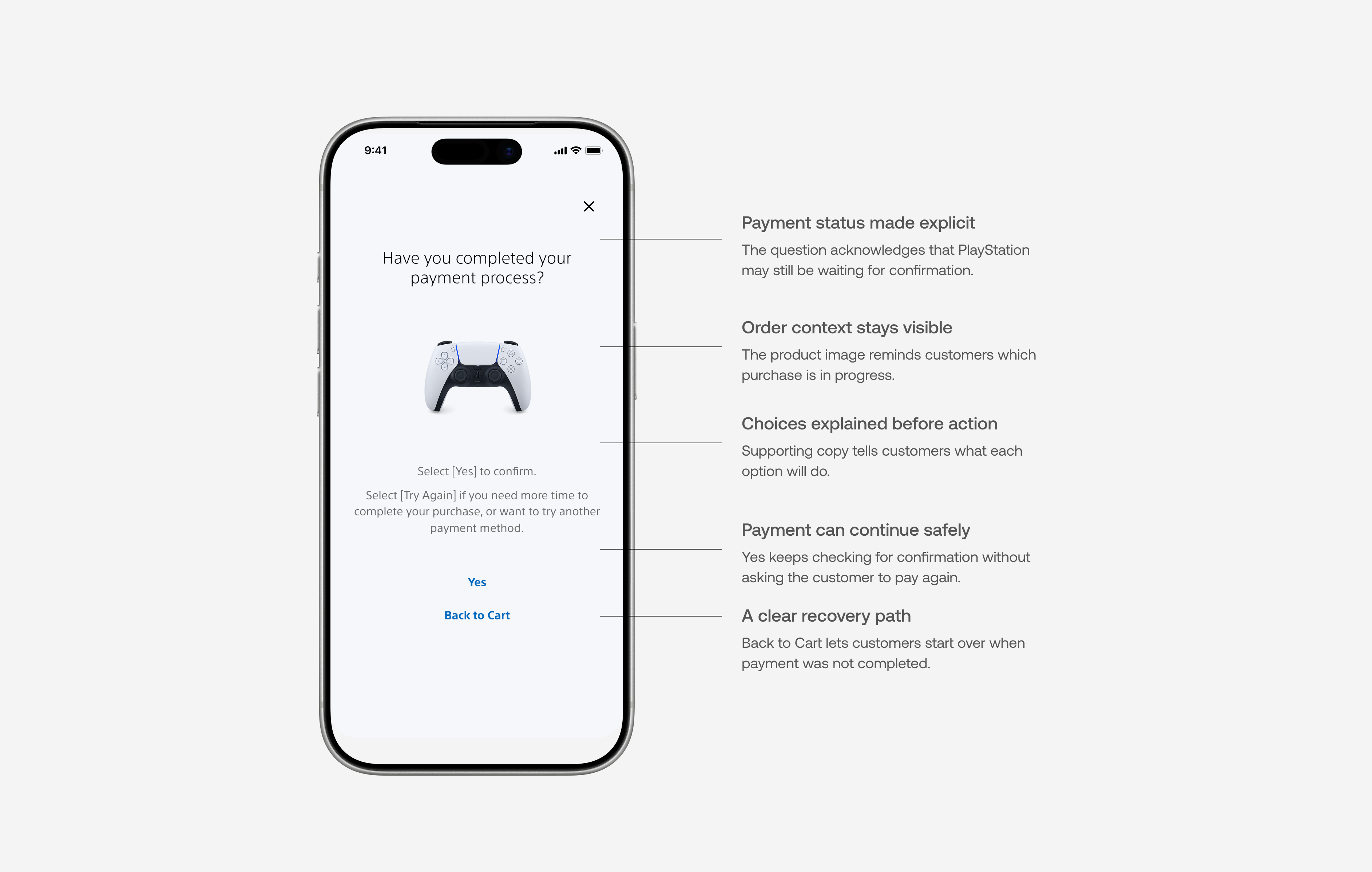
The new timeout page asked whether the customer had completed payment with the provider. This made the uncertain status clear and connected each answer to a specific next step.
- Yes — keep the order open and show Pending confirmation while PlayStation checks for the provider response.
- Back to Cart — return with the same items so the customer can choose another payment method or try again.
Bancontact could remain pending while confirmation arrived. iDEAL followed a different return path, so it used a separate recovery flow.
The updated checkout reduced time and abandonment
Tandem Commerce usability testing
100%
completed card setup
65%
less time than the previous card-entry experience
4.6
satisfaction
4.7
ease of use
PlayStation Direct after launch
36%
less time on mobile than the initial release
50%
less time for Bancontact than the earlier Worldpay flow
22%
lower cart abandonment
Each project solved a different break in the payment journey
The first project addressed the transition from PS5 to mobile. The second addressed the delay between completing an external payment and receiving confirmation from PlayStation.
In both cases, my role extended beyond the payment screen. I defined what each system should show during the transition and gave customers a clear next step when the final status was not yet available.